Hi Folks,
Update Rollup 2 for DPM 2016 has now been released and it fixes some pretty annoying problems
Get it here: http://www.catalog.update.microsoft.com/Search.aspx?q=3209593
For more detailed info:
https://support.microsoft.com/sv-se/help/3209593/update-rollup-2-for-system-center-2016-data-protection-manager
Kind Regards
Markus Eliasson
Friday, February 10, 2017

Thursday, December 15, 2016
Unable to configure protection for Vmware VMs
Hi,
Today I ran into a problem while configuring protection for a VMware virtual machine. I've previously successfully protected VMs on the same cluster and datstoreso I draw the conclusion it was the VM itself that was causing the issue.
Error: In the DPM-console I had the following error which clearly states why the configure protection job failed: The VM has one or several snapshots.

Today I ran into a problem while configuring protection for a VMware virtual machine. I've previously successfully protected VMs on the same cluster and datstoreso I draw the conclusion it was the VM itself that was causing the issue.
Error: In the DPM-console I had the following error which clearly states why the configure protection job failed: The VM has one or several snapshots.

Resolution: I contacted the person who had created the snapshot and asked if it was OK for me to delete that snapshot. Then I logged onto the vSphere-console and deleted the snapshot. After that the configure protection-job completed successfully and the Replica creation could begin.
Conclusion: Before you start adding protection for your VMware VMs. Make sure you are not having an unsupported scenario as DPM VMware protection does not support the following scenarios:
- Raw Device Mapping (RDM) pass thru disks can be configured in either physical compatibility mode or virtual compatibility mode. Physical RDM (PRDM) is not supported, however Virtual RDM (VRDM) is supported.
- Clustered VMs are supported, however VMs hosted on shared disk clusters are not supported. Change tracking on shared disks is not supported by VMware.
- DPM cannot detect or protect VApps.
- DPM currently cannot protect VMware VMs to tape or a secondary DPM server.
- Manual replica creation is not supported. You must either let DPM create the initial replica at the time of protection or schedule it to run later.
- DPM can protect VMs with snapshots, however the snapshots are not backed up and are not restored during a VM recovery. If the snapshot was created before protection, DPM cannot protect that VM because VMware does not support enabling change tracking for any VM that has existing snapshots. A work around is to delete the existing snapshots.
- The Microsoft Operations Manager console does not currently support monitoring VMware data sources, however they will show up under the All Datasources view. VMware protection alerts will only show under All Alerts. You can modify the OpsMgr management pack (MP) by making a custom view and overriding the DPM MP.
Kind Regards
Markus Eliasson
Friday, September 2, 2016
Update Rollup 11: Protect VMware VMs with DPM!
Hi,
Microsoft just released Update Rollup 11 for DPM and today is the day many of us has been waiting for: Support for backup and restore of VMware virtual machines at vCenter/ESXi-level!
Here is some other highlights of VMware VM backup with DPM:
Microsoft just released Update Rollup 11 for DPM and today is the day many of us has been waiting for: Support for backup and restore of VMware virtual machines at vCenter/ESXi-level!
Here is some other highlights of VMware VM backup with DPM:
- Agentless backup
- Backup at vCenter or ESXi level
- Backup VMware VM folders
- Ability to do ILR
- Protect large data center using DPM Scale Out
- Backup to Disk/Cloud
- Go the Microsoft Update Catalog and download UR11 (Remeber: No restart needed for production-agents if you are UR6 or above!) :
http://catalog.update.microsoft.com/v7/site/search.aspx?q=3162908 - Have a look at the 2½min video that provides value prop and overview of VMware VM backup: Announcing VMware VM Backup using System Center Data Protection Manager
- Check out this guide on how to configure backup of VMware VMs in four steps:
Four simple steps to backup VMware VMs using SC DPM
Kind Regards
Markus Eliasson
Markus Eliasson
Thursday, May 26, 2016
Update Rollup 10 for System Center 2012 R2 Data Protection Manager Released!
Hi folks,
Update Rollup 10 has been released and even if we did not got any new features in this UR, Microsoft provides us with a great deal of fixes for known issues!
Remember that if you are running Update Rollup 6 or later, there will be no requirement for restarting your production servers when you upgrade the DPM-agents to UR 10!
Update Rollup 10 for System Center 2012 R2 Data Protection Manager
Kind Regards
Markus Eliasson
Update Rollup 10 has been released and even if we did not got any new features in this UR, Microsoft provides us with a great deal of fixes for known issues!
Remember that if you are running Update Rollup 6 or later, there will be no requirement for restarting your production servers when you upgrade the DPM-agents to UR 10!
Update Rollup 10 for System Center 2012 R2 Data Protection Manager
Kind Regards
Markus Eliasson
Friday, April 29, 2016
Recover data to another DPM-server from Azure backup vault
Here is a quick guide on how to recover data from an Azure Backup Vault. This scenario can be leveraged when a DPM-server has failed and you need to recover the data it has backed up.
Requirements
Step by Step
Requirements
- System Center Data Protection Manager 2012 R2 with UR7 or later installed
- The latest Azure Backup Agent (Download link)
Step by Step
- From the Recovery tab of the DPM management console, click 'Add External DPM' (at the top left of the screen).
- Download new vault credentials from the vault associated with the DPM server where the data is being recovered, choose the DPM server from the list of DPM servers registered with the backup vault, and provide the encryption passphrase associated with the DPM server whose data is being recovered.
(Note:Only DPM servers associated with the same registration vault can recover each other’s data.)
- Once the External DPM server is successfully added, you can browse the data of external DPM server and local DPM server from the Recovery tab.
- Browse the available list of production servers protected by the external DPM server and select the appropriate data source.
- Select the date from the Recovery points drop down and select the Recovery time.
- A list of files and folders will appear in the bottom pane which can be browsed and recovered to any location.
- Right click the appropriate item and click Recover.
- Go thourght the Recovery Wizard and start recovering.
When you are done you can click Clear External DPM on the Recovery tab of the DPM server to remove the view of the external DPM server.
Kind Regards
Markus Eliasson
Markus Eliasson
Monday, March 21, 2016
Backup Exchange 2016 with DPM 2012 R2
Hi,
Today Microsoft updated the support matrix for DPM and we are happy to see that from Update Rollup 9 you are able to configure protection for Exchange 2016:
DPM protection support matrix
DPM can backup following Exchange configurations:
1. Standalone Exchange Server.
2. Exchange DAG, including both the configurations:
* IP based DAG
* IP-less DAG (DAG without a cluster administrative Access Point)
Note: DPM currently support Exchange 2016 on NTFS data volumes. We are working on adding support for REFS data volumes and will be added in later update
Regards
Markus Eliasson
Today Microsoft updated the support matrix for DPM and we are happy to see that from Update Rollup 9 you are able to configure protection for Exchange 2016:
DPM protection support matrix
DPM can backup following Exchange configurations:
1. Standalone Exchange Server.
2. Exchange DAG, including both the configurations:
* IP based DAG
* IP-less DAG (DAG without a cluster administrative Access Point)
Note: DPM currently support Exchange 2016 on NTFS data volumes. We are working on adding support for REFS data volumes and will be added in later update
Regards
Markus Eliasson
Tuesday, February 23, 2016
Troubleshoot DPM Service unable to start, unable to remove agents and 9xx-errors in the Event Viewer
Hi,
Quick post on one thing to check if you are expericening the following symtoms/issues on a DPM-server:
- DPM AccessManager Service not starting
- DPM Accessmanager Service fails to start
- DPM service not starting or having trouble restarting
- Msdpm cannot be found
- Unable to remove agents
- Various 9xx errors in the event viewer
Resolution:
*** Important! Always create a backup of the DPM-database before doing any changes! ***
- Open SQL Management Studio on the dpm server and connect to the instance of your DPM sql engine
- Go to DPMDatabase (in my case: DPMDB_2012) > Tables > dbo.tbl_DLS_GlobalSetting
- Choose "Edit the top 200 rows" of that table and you will find a property called: DBRecovery
- The value should be 0, sometimes while doing dpmsyncs and other attempted repairs to dpm, this will be set to 1 and never change back to 0.
I hope this will help someone with their troubleshooting!
//Markus
Wednesday, February 17, 2016
Monitor DPM Storage Pool
Hi,
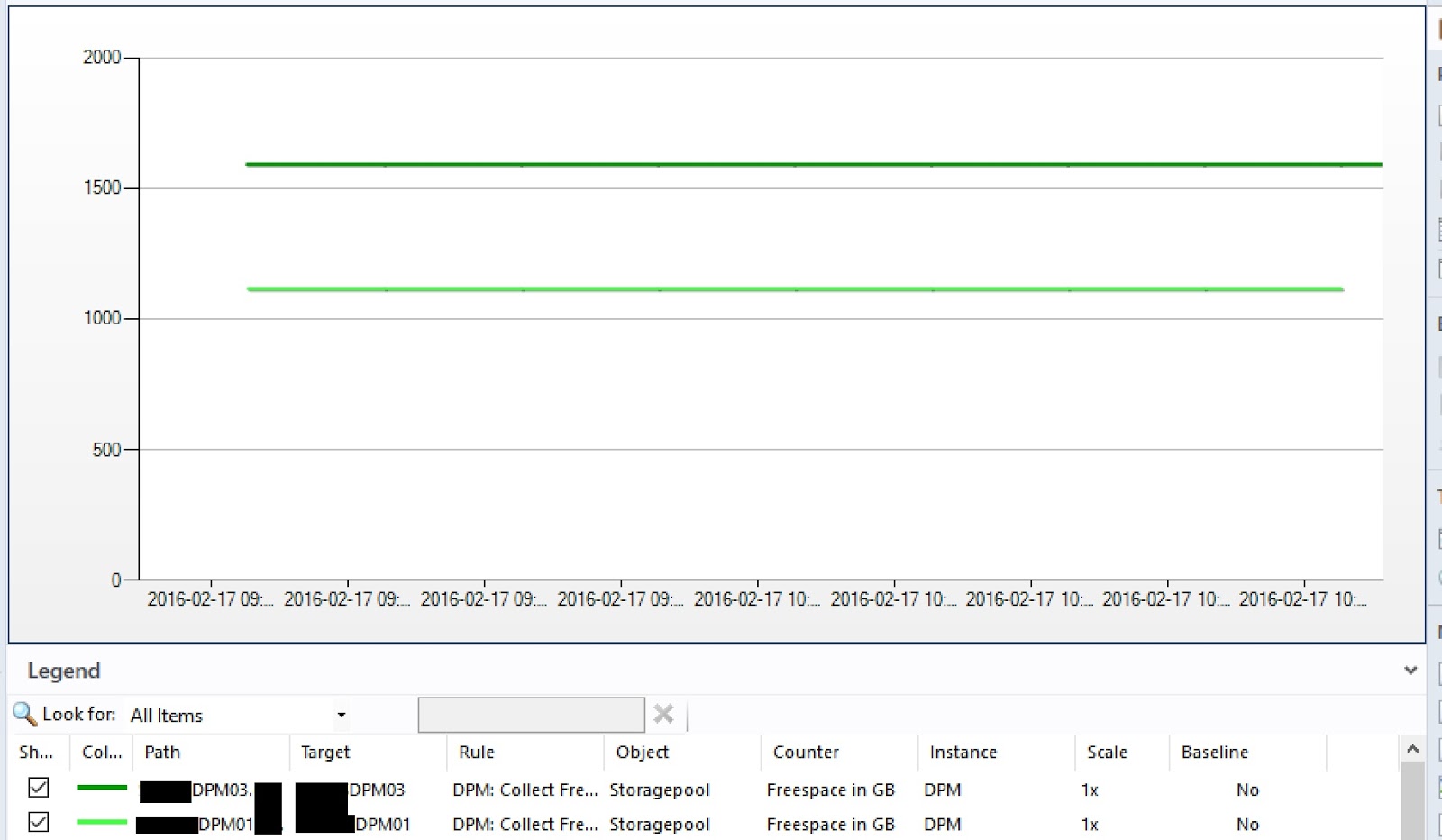
I've created a small PowerShell-script that is ready to be used as a Performance Rule in System Center Operations Manager to monitor the amount of freespace in the storage pool on your DPM-server.
I will post a complete guide later on how to create the rule in SCOM!

-----------------------------------
#Load the MOMScript API and the PropertBag provider
$API = New-Object -comObject "MOM.ScriptAPI"
$bag = $api.CreatePropertyBag()
#Log an event at script-start
$api.LogScriptEvent("FreeDiskSpace.ps1",3280,0,"Collect FreeSpace in DPM-storagepool Script is starting")
#Main PowerShell-script
$FS = get-dpmdisk | where {$_.DiskTypeLabel -ne "Basic"} | Select UnallocatedSpaceLabel | ft -HideTableHeaders| Out-String -Stream
$FS = $FS | ForEach-Object {$_ -replace "GB", ""}
$FreeSpace = ($FS | Measure-Object -Sum | select sum | ft -HideTableHeaders | Out-String).trim()
$TS = get-dpmdisk | where {$_.DiskTypeLabel -ne "Basic"} | Select TotalCapacityLabel | ft -HideTableHeaders| Out-String -Stream
$TS = $TS | ForEach-Object {$_ -replace "GB", ""}
$TotalSpace = ($TS | Measure-Object -Sum | select sum | ft -HideTableHeaders | Out-String).trim()
#Add the data into the PropertyBag
$bag.AddValue("FreeSpace",$FreeSpace)
$bag.AddValue("TotalSpace",$TotalSpace)
#Log an event that our script is complete
$api.LogScriptEvent("FreeDiskSpace.ps1",3281,0,"Collect FreeSpace in DPM-storagepool Script is complete.
$FreeSpace GB of $TotalSpace GB free in diskpool on $env:computername")
#Output the PropertyBag data for SCOM consumption
$bag
-----------------------------------
Kind Regards
Markus Eliasson
I've created a small PowerShell-script that is ready to be used as a Performance Rule in System Center Operations Manager to monitor the amount of freespace in the storage pool on your DPM-server.
I will post a complete guide later on how to create the rule in SCOM!
-----------------------------------
#Load the MOMScript API and the PropertBag provider
$API = New-Object -comObject "MOM.ScriptAPI"
$bag = $api.CreatePropertyBag()
#Log an event at script-start
$api.LogScriptEvent("FreeDiskSpace.ps1",3280,0,"Collect FreeSpace in DPM-storagepool Script is starting")
#Main PowerShell-script
$FS = get-dpmdisk | where {$_.DiskTypeLabel -ne "Basic"} | Select UnallocatedSpaceLabel | ft -HideTableHeaders| Out-String -Stream
$FS = $FS | ForEach-Object {$_ -replace "GB", ""}
$FreeSpace = ($FS | Measure-Object -Sum | select sum | ft -HideTableHeaders | Out-String).trim()
$TS = get-dpmdisk | where {$_.DiskTypeLabel -ne "Basic"} | Select TotalCapacityLabel | ft -HideTableHeaders| Out-String -Stream
$TS = $TS | ForEach-Object {$_ -replace "GB", ""}
$TotalSpace = ($TS | Measure-Object -Sum | select sum | ft -HideTableHeaders | Out-String).trim()
#Add the data into the PropertyBag
$bag.AddValue("FreeSpace",$FreeSpace)
$bag.AddValue("TotalSpace",$TotalSpace)
#Log an event that our script is complete
$api.LogScriptEvent("FreeDiskSpace.ps1",3281,0,"Collect FreeSpace in DPM-storagepool Script is complete.
$FreeSpace GB of $TotalSpace GB free in diskpool on $env:computername")
#Output the PropertyBag data for SCOM consumption
$bag
-----------------------------------
Markus Eliasson
Thursday, February 4, 2016
Move protected data between DPM-disks: MigrateDatasourceDataFromDPM
Hi everyone,
Here is an example on how I use the MigrateDatasourceDataFromDPM.ps1 when I want to consolidate protected data or just empty one disk in the DPM storage-pool.
The ntdiskid-number in the script is the number you can see in either the get-DPMDisk output, the Windows Disk Management GUI or under Management - Disks in the DPM-console.
In the example below I want to move all data from disk 1 to disk 3,5 and 6:
//Markus
Here is an example on how I use the MigrateDatasourceDataFromDPM.ps1 when I want to consolidate protected data or just empty one disk in the DPM storage-pool.
The ntdiskid-number in the script is the number you can see in either the get-DPMDisk output, the Windows Disk Management GUI or under Management - Disks in the DPM-console.
In the example below I want to move all data from disk 1 to disk 3,5 and 6:
$source = get-dpmdisk -dpmserver MyDpmServer | where {$_.ntdiskid -eq 1}
$destination = get-dpmdisk -dpmserver MyDpmServer | where {3,5,6 -contains $_.ntdiskid}
MigrateDatasourceDataFromDPM.ps1 -DPMServername MyDpmServer -source $source -destination $destination
//Markus
Friday, January 29, 2016
Update Rollup 9 for System Center 2012 R2 Data Protection Manager is now available!
Hi!
Update Rollup 9 has been released and for all the DPM-admin out there. Here is the fix we all have been waiting for:
There are more features and a lot of fixes that prevent issues in UR9 so go ahead and start upgrading: Update Rollup 9 for System Center 2012 R2 Data Protection Manager
Have a great Friday and a lovely weekend!
Kind Regards
Markus Eliasson
Update Rollup 9 has been released and for all the DPM-admin out there. Here is the fix we all have been waiting for:
- No production server restart is required when you upgrade from DPM 2012 R2 Update Rollup 6 or later versions!
"We have performed an extensive review of the DPM architecture to avoid production server restarts when you upgrade the DPM Agent. There were a few cases in which the Agent update was flagging for restart, and these are fixed now. Therefore, if you already upgraded to DPM 2012 R2 Update Rollup 6 or a later version, you will not experience a restart when you upgrade to this update."
There are more features and a lot of fixes that prevent issues in UR9 so go ahead and start upgrading: Update Rollup 9 for System Center 2012 R2 Data Protection Manager
Have a great Friday and a lovely weekend!
Kind Regards
Markus Eliasson
Thursday, January 28, 2016
Setdpmserver, errorcode = 0x80070005, error says: access is denied
Hi,
So today I ran into an interesting problem when installing a DPM-agent on a Domain Controller in another trusted-domain.
The agent-installation completed successfully but when I ran:
SetDpmserver.exe -dpmservername MyDPMServer.Bucatech.com
In a elevated command prompt I got received the error
SetDpmServer failed with errorcode = 0x80070005, error says: Access is denied.
My solution, after some hours of troubleshooting, was to run a Enter-PsSession to the production server, from the DPM-server in my Bucatech.com-domain:
Enter-PSSession ProdServer.Contoso.com -Credential Contoso\DomainAdminUser
*fill in my password in the authentication-box*
CD 'C:\Program Files\Microsoft Data Protection Manager\DPM\bin'
.\SetDPMServer.exe -dpmservername MyDPMServer.Bucatech.com
I hope this can help anyone of you!
Kind Regards
Markus Eliasson
So today I ran into an interesting problem when installing a DPM-agent on a Domain Controller in another trusted-domain.
The agent-installation completed successfully but when I ran:
SetDpmserver.exe -dpmservername MyDPMServer.Bucatech.com
In a elevated command prompt I got received the error
SetDpmServer failed with errorcode = 0x80070005, error says: Access is denied.
My solution, after some hours of troubleshooting, was to run a Enter-PsSession to the production server, from the DPM-server in my Bucatech.com-domain:
Enter-PSSession ProdServer.Contoso.com -Credential Contoso\DomainAdminUser
*fill in my password in the authentication-box*
CD 'C:\Program Files\Microsoft Data Protection Manager\DPM\bin'
.\SetDPMServer.exe -dpmservername MyDPMServer.Bucatech.com
I hope this can help anyone of you!
Kind Regards
Markus Eliasson
Tuesday, January 12, 2016
What's coming for System Center in 2016?
Hi everyone,
Just a quick post to update you on what new features we can expect to see in DPM 2016:
Just a quick post to update you on what new features we can expect to see in DPM 2016:
- Protect mixed mode clusters
- New form of change tracking to replace VSS snapshot-based backups - Resilient Change Tracking (RCT)
- Storage Spaces Direct (S2D) support
- Virtual TPM support for protection of Shielded VMs
How these new features will integrate with VMM 2016 and its new "VM Checkpoint support" ("Production" checkpoints in Server 2016) is going to be very interesting!
Here is a great bloggpost covering all System Center products:
Best Regards
Markus Eliasson
Monday, January 4, 2016
Microsoft recommends installing Update Rollup 8 to improve stability
Hi everyone!
Its now 2016 and we have got a whole new year of exciting new features and releases in front of us, but lets focus on our current situation for a moment.
Update Rollup 8 for DPM 2012 R2 has been out almost two months now and if you haven't already upgraded now is the time. Microsoft has received good feedback from thousands of customers and have decided to make the UR8 marked as "Important Update" on Microsoft Update.
Here is a complete list of important issues that has been fixed since DPM UR7:
- DPM console crash issues.
- If you try to back up a SharePoint site that uses SQL Always On as a content database, SQL logs are not truncated resulting in SQL disks to become full.
- If you have multiple SharePoint farms hosted on the same SQL cluster, with different instances but the same database names, DPM cannot back up the correct SharePoint farm content.
- You try to back up Hyper-V virtual machines (VM) that have a replica and both the Active virtual machine and the Replica virtual machine are managed by the same System Center VMM server. Previously, you had no control to select between Active and Replica virtual machines for backup. This frequently caused backups to fail, depending on the setup.
- If you try to protect large number of virtual machines in a single Protection Group, and you have the VMM Helper Service enabled, some backups may fail with "System.TimeoutException".
- In some cases, alerts that are resolved in DPM are not synced in the DPM Central Console.
- If you are trying to recover data from an imported tape, DPM may crash with a "Connection to the DPM service has been lost" error.
- When you try to protect a SQL failover cluster, the Data Protection Manager UI may crash for backup or synchronization operation.
- DPM self-service recovery for SQL databases may fail with the error “Cannot connect to DPM server …”
- End User Recovery/SSRT may not work in some cases for mirrored SQL databases.
- You cannot protect a SQL database on an Availability Group (AG) if different AG have the same database name.
Get UR8 now! = https://support.microsoft.com/en-us/kb/3086084
Kind Regards
Markus Eliasson
Markus Eliasson
Monday, November 2, 2015
ID 30115: VssError: Insufficient storage available to create either the shadow copy storage file or other shadow copy data.(0x8004231F)
Hi folks,
Quick post about a small problem you may ran into from time to time!
Error Messages
You recevie the following error message in the DPM-console:
The Shadow Copy Service is allocated limited amount of space which is not sufficient for the creation of a snap.
Solution

Quick post about a small problem you may ran into from time to time!
Error Messages
You recevie the following error message in the DPM-console:
DPM failed to synchronize changes for SQL Server 2012 database SQL01\SQLIN03\DPMDB on SQL01.contoso.local because the snapshot volume did not have sufficient storage space to hold the churn on the protected computer (ID 30115 Details: VssError:Insufficient storage available to create either the shadow copy storage file or other shadow copy data.(0x8004231F))And the following event is logged in the System log on the protected server:
When preparing a new volume shadow copy for volume E:, the shadow copy storage on volume C:\...\{volume-GUID} could not be located in non-critical space. Consider using a shadow copy storage volume that does not have any shadow copies.Cause
The Shadow Copy Service is allocated limited amount of space which is not sufficient for the creation of a snap.
Solution
- Right click the volume (in my case E:) in disk management.
- Go to the Shadow Copies-tab and located the volume (still E:) in the "Select a volume"list.
- Press settings and increase the "Maximum size:" or configure it with "No limit:"
- Press OK in the Settings-window and re run your job from the DPM-console

Best Regards
Markus Eliasson
Wednesday, October 28, 2015
Update Rollup 8 for System Center 2012 R2 Data Protection Manager
Hi folks,
DPM Update Rollup 8 has been released!
https://support.microsoft.com/en-us/kb/3086084
https://support.microsoft.com/en-us/kb/3086084
Unfortunately there is no new features but something worth mention is the following information:
"Note If the DPM server and protected servers are running DPM 2012 R2 Update Rollup 5 (version 4.2.1292.0) or earlier update rollups, the Agent update will require a restart of protected servers."So what does this mean? Well, are you running UR6 and UR7 DPM-agents in your enviroment. There is no need for restart when you update them to UR8!
Below is the Issues that are fixed in this update rollup:
- The DPM Agent crashes intermittently during a backup.
- If you are trying to recover data from an imported tape, DPM may crash with a "Connection to the DPM service has been lost" error.
- If you try to back up a SharePoint site that uses SQL Always On as a content database, SQL logs are not truncated as expected.
- You cannot verify tape library compatibility for tapes that use RSMCompatmode settings such as IBM 35xx, 2900, and so on.
- If you have multiple SharePoint farms hosted on the same SQL cluster with different instances but the same database names, DPM cannot back up the correct SharePoint farm content.
- If you run Update Rollup 7 for Data Protection Manager 2012 R2, and you have already configured online protection for one or more protection groups, trying to change the protection group populates the default DPM settings for the "Select long-term goals" wizard instead of the previous configured values.
- When you try to protect a SQL failover cluster, the Data Protection Manager UI crashes for every backup or synchronization operation.
- If you install Update Rollup 7 for Data Protection Manager 2012 R2, self-service recovery for SQL databases may not work, and you receive the following error message:

Kind Regards
Markus Eliasson
Wednesday, October 21, 2015
Event ID 10028: DCOM was unable to communicate with the computer...
Hi,
A small post regarding my solution to a problem I encountered today.Issue:
Backup-jobs have been failing and your DPM-agent is listed as unavalible.
In the Event Viewer on your DPM-server event id 10028 is logged in the System log:
DCOM was unable to communicate with the computer contoso-app01.contoso.local using any of the configured protocols; requested by PID a24 (C:\Program Files\Microsoft System Center 2012\DPM\DPM\bin\msdpm.exe
The first thing you would troubleshoot is if there are any firewalls that are blocking the communication but for my case I knew nothing had change in the communication.
Resolution
1. Open up an elevated command promt and run ipconfig /flushdns.
2. Refresh your agent on the Management-tab in your DPM-console.
3. Re-run any failed DPM-jobs.
A very simple solution in my case to get the jobs working again but there is still some work to find out if there is an issue in the DNS registration in Active Directory.
Take care!
//Markus
Tuesday, October 13, 2015
Restart VSS-writers manually without server reboot
Hi,
An alternative solution other than restarting the server is to restart each of the associated services for each of the VSS writers!
Find failed VSS-writers and restart service:
- Find each of the VSS writers in a failed state by issuing this command in an elevated command prompt - vssadmin list writers.
- Make a list of all the failed VSS writers or take a screenshot.
- Find the VSS writer's associated Service Display Name in the table below and restart the service.
- Issue the command again to confirm the status has changed Stable with no Error - vssadmin list writers.
- Attempt to perform another snapshot.
- If the VSS writers fail again, it will be necessary to restart the server.
| VSS Writer | Service Name | Service Display Name |
| ASR Writer | VSS | Volume Shadow Copy |
| BITS Writer | BITS | Background Intelligent Transfer Service |
| COM+ REGDB Writer | VSS | Volume Shadow Copy |
| DFS Replication service writer | DFSR | DFS Replication |
| DHCP Jet Writer | DHCPServer | DHCP Server |
| FRS Writer | NtFrs | File Replication |
| FSRM writer | srmsvc | File Server Resource Manager |
| IIS Config Writer | AppHostSvc | Application Host Helper Service |
| IIS Metabase Writer | IISADMIN | IIS Admin Service |
| Microsoft Exchange Writer | MSExchangeIS | Microsoft Exchange Information Store |
| Microsoft Hyper-V VSS Writer | vmms | Hyper-V Virtual Machine Management |
| NTDS | NTDS | Active Directory Domain Services |
| OSearch VSS Writer | OSearch | Office SharePoint Server Search |
| OSearch14 VSS Writer | OSearch14 | SharePoint Server Search 14 |
| Registry Writer | VSS | Volume Shadow Copy |
| Shadow Copy Optimization Writer | VSS | Volume Shadow Copy |
| SPSearch VSS Writer | SPSearch | Windows SharePoint Services Search |
| SPSearch4 VSS Writer | SPSearch4 | SharePoint Foundation Search V4 |
| SqlServerWriter | SQLWriter | SQL Server VSS Writer |
| System Writer | CryptSvc | Cryptographic Services |
| TermServLicensing | TermServLicensing | Remote Desktop Licensing |
| WINS Jet Writer | WINS | Windows Internet Name Service (WINS) |
| WMI Writer | Winmgmt | Windows Management Instrumentation |
Kind Regards
Markus Eliasson
Monday, October 12, 2015
The replica is inconsistent with the protected data source (ID30111)
Hi,
Today I ran into a virtual machine which after months of successful jobs started to fail while trying to protect it with via Online Snapshot.
The event logs on the Hyper-V host for the virtual machine did not give me any additional information so I logged onto the virtual machine itself and ran VSSADMIN List Writers and it showed almost all VSS-writers in a "[10] Failed" state with the error "Timed Out".
Today I ran into a virtual machine which after months of successful jobs started to fail while trying to protect it with via Online Snapshot.
 |
| ID 30111 |
I restarted all failed VSS-writers but as soon as I restarted the backup-job, the VSS-writers timed out again. The application event log on the virtual machine had the following errors:
- Event ID 17 "Could not find a matching original volume for shadow volume \\?\Volume{GUID}"
- Event ID 12293: "Volume Shadow Copy Service error: Error calling a routine on a Shadow Copy Provider {74600e39-7dc5-4567-a03b-f091d6c7b092}. Routine details PreFinalCommitSnapshots({a2709227-7262-48ab-987b-5dc13bac4ab9}, 1) [hr = 0x80070490, Element not found.].
Operation: Executing Asynchronous Operation.
Context: Current State: DoSnapshotSet.
Resolution
As Event ID 17 was referring to a volume, I opened up an elevated PowerShell-window and ran Diskpart followed by List disk.
From the output, I could see was that one of my volumes were in an Offline state:
Disk 0 Online 60 GB 0 B *
  Disk 1 Offline 20GB 1024KB
  Disk 2 Online 100GB 0 B
I opened up Disk Management (diskmgmt.msc), right-clicked disk 2 and made it Online.
Without further actions, I tried to perform a consistency check on the virtual machine from the DPM-console and the job completed successfully.
Kind Regards
Markus Eliasson
Monday, August 24, 2015
Expired Disk Based Recovery Points are not deleted after installing DPM 2012 R2 UR7
Hi
Everyone,
After you install DPM 2012 R2
UR7 update (KB3065246), DPM cannot delete expired recovery points. This
will lead to extra recovery point volume usage.
Please follow the link and instructions below to download
and install the fix for this issue:
Fix for a known issue with Update Rollup 7 for System Center 2012 R2 Data Protection Manager
Fix for a known issue with Update Rollup 7 for System Center 2012 R2 Data Protection Manager
Install Instructions:
Please ensure
you are currently running DPM 2012 R2 UR7 before applying the fix.
The issue is not applicable to older updates and will be fixed automatically in later updates. Please perform the below steps on all DPM servers running DPM 2012 R2 UR7. Steps to verify that you are running DPM 2012 R2 UR7
The issue is not applicable to older updates and will be fixed automatically in later updates. Please perform the below steps on all DPM servers running DPM 2012 R2 UR7. Steps to verify that you are running DPM 2012 R2 UR7
1. Open DPM UI
and click on help menu option and click on "About Data Protection
Manager" option.
2. A popup will
be displayed with version information.
3. Make sure
version is 4.2.1338.0, else no need to apply the fix.
Updating pruneshadowcopiesDpm2010.ps1 script:
4. Backup
original pruneshadowcopiesDpm2010.ps1
from System Drive:\Program Files\Microsoft System Center 2012 R2\DPM\DPM\bin to
another location to make sure you have a copy saved with you.
5. Download pruneshadowcopiesDpm2010.ps1 file from
the link above.
6. Replace the
original pruneshadowcopiesDpm2010.ps1
at the location in step 4 with the new downloaded pruneshadowcopiesDpm2010.ps1
file.
7. Monitor DPM
for one day and it should clean up the expired recovery points, the cleanup
happens at regular intervals once a day during midnight.
Shrinking the recovery point volume (optional):
Shrinking the recovery point volume (optional):
8. In case the
Recovery Point Volume already increased and DPM is consuming a lot of storage
you can try the option of shrinking the recovery point volume using the below
steps:
a. Click on the Protection Tab
b. Right click on the Protection Group and select “Modify Disk Allocation”
c. Click on the Shrink link next to each Recovery Point Volume, it will display
the new size of the volume.
d. Click on OK it will open a new popup showing the progress of DPM Shrink
operation.
Note: Use the Shrink feature
judiciously, repeated small shrinks cause free space fragmentation and
increases the number of extents.
Kind Regards
Markus Eliasson
Markus Eliasson
Wednesday, May 6, 2015
Troubleshoot ID 30111: VssError: The specified object was not found
Hi folks,
Here's a quick solution how to fix the following error in DPM in a scenario where you have configured Online Snapshot-protection of a virtual machine:
//Markus
Here's a quick solution how to fix the following error in DPM in a scenario where you have configured Online Snapshot-protection of a virtual machine:
The VSS application writer or the VSS provider is in a bad state. Either it was already in a bad state or it entered a bad state during the current operation. (ID 30111 Details: VssError: The specified object was not found. (0x80042308))
Troubleshooting steps:
- Verify that the virtual machine is not deleted in Hyper-V/VMM.
- Modify the protection group where you configured protection for the virtual machine.
- Expand your Hyper-V cluster and locate your virtal machine in the "Modify Group"-wizard.
- Expand the virtual machine and make sure the checkbox for "Hyper-V\Online\ServerName" is checked.
- Complete the "Modify Group"-wizard by clicking Next untill it updates the configuration.
- When you succesfully have created a recovery point for the virtual machine; Stop the protection of the failing datasource.
Problem cause:
This problem will occur when a virtual machine gets clooned or deleted and then recreated again with the same name.//Markus
Subscribe to:
Posts
(
Atom
)