Hi,
Today Microsoft updated the support matrix for DPM and we are happy to see that from Update Rollup 9 you are able to configure protection for Exchange 2016:
DPM protection support matrix
DPM can backup following Exchange configurations:
1. Standalone Exchange Server.
2. Exchange DAG, including both the configurations:
* IP based DAG
* IP-less DAG (DAG without a cluster administrative Access Point)
Note: DPM currently support Exchange 2016 on NTFS data volumes. We are working on adding support for REFS data volumes and will be added in later update
Regards
Markus Eliasson
Monday, March 21, 2016

Tuesday, February 23, 2016
Troubleshoot DPM Service unable to start, unable to remove agents and 9xx-errors in the Event Viewer
Hi,
Quick post on one thing to check if you are expericening the following symtoms/issues on a DPM-server:
- DPM AccessManager Service not starting
- DPM Accessmanager Service fails to start
- DPM service not starting or having trouble restarting
- Msdpm cannot be found
- Unable to remove agents
- Various 9xx errors in the event viewer
Resolution:
*** Important! Always create a backup of the DPM-database before doing any changes! ***
- Open SQL Management Studio on the dpm server and connect to the instance of your DPM sql engine
- Go to DPMDatabase (in my case: DPMDB_2012) > Tables > dbo.tbl_DLS_GlobalSetting
- Choose "Edit the top 200 rows" of that table and you will find a property called: DBRecovery
- The value should be 0, sometimes while doing dpmsyncs and other attempted repairs to dpm, this will be set to 1 and never change back to 0.
I hope this will help someone with their troubleshooting!
//Markus
Wednesday, February 17, 2016
Monitor DPM Storage Pool
Hi,
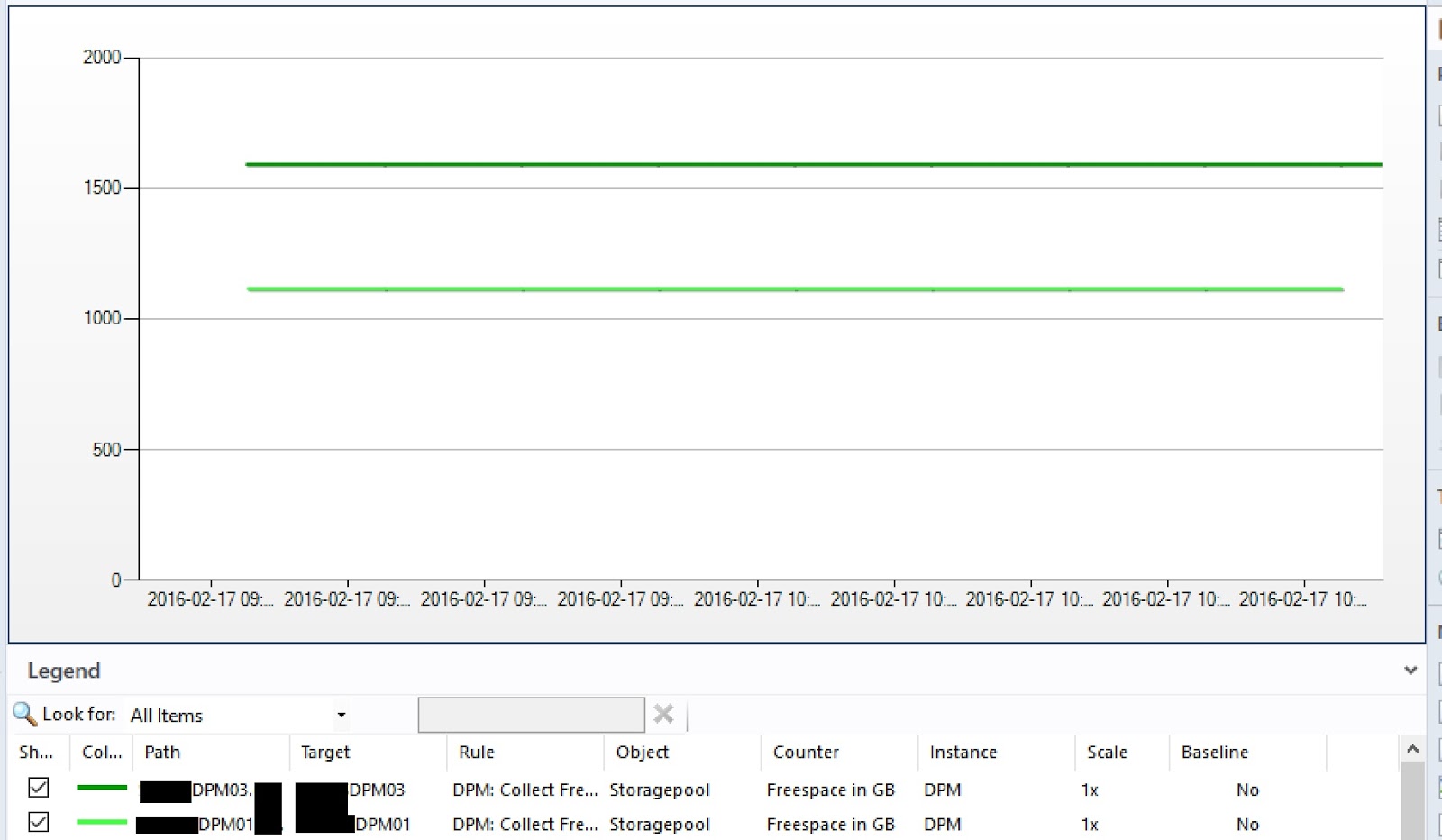
I've created a small PowerShell-script that is ready to be used as a Performance Rule in System Center Operations Manager to monitor the amount of freespace in the storage pool on your DPM-server.
I will post a complete guide later on how to create the rule in SCOM!

-----------------------------------
#Load the MOMScript API and the PropertBag provider
$API = New-Object -comObject "MOM.ScriptAPI"
$bag = $api.CreatePropertyBag()
#Log an event at script-start
$api.LogScriptEvent("FreeDiskSpace.ps1",3280,0,"Collect FreeSpace in DPM-storagepool Script is starting")
#Main PowerShell-script
$FS = get-dpmdisk | where {$_.DiskTypeLabel -ne "Basic"} | Select UnallocatedSpaceLabel | ft -HideTableHeaders| Out-String -Stream
$FS = $FS | ForEach-Object {$_ -replace "GB", ""}
$FreeSpace = ($FS | Measure-Object -Sum | select sum | ft -HideTableHeaders | Out-String).trim()
$TS = get-dpmdisk | where {$_.DiskTypeLabel -ne "Basic"} | Select TotalCapacityLabel | ft -HideTableHeaders| Out-String -Stream
$TS = $TS | ForEach-Object {$_ -replace "GB", ""}
$TotalSpace = ($TS | Measure-Object -Sum | select sum | ft -HideTableHeaders | Out-String).trim()
#Add the data into the PropertyBag
$bag.AddValue("FreeSpace",$FreeSpace)
$bag.AddValue("TotalSpace",$TotalSpace)
#Log an event that our script is complete
$api.LogScriptEvent("FreeDiskSpace.ps1",3281,0,"Collect FreeSpace in DPM-storagepool Script is complete.
$FreeSpace GB of $TotalSpace GB free in diskpool on $env:computername")
#Output the PropertyBag data for SCOM consumption
$bag
-----------------------------------
Kind Regards
Markus Eliasson
I've created a small PowerShell-script that is ready to be used as a Performance Rule in System Center Operations Manager to monitor the amount of freespace in the storage pool on your DPM-server.
I will post a complete guide later on how to create the rule in SCOM!
-----------------------------------
#Load the MOMScript API and the PropertBag provider
$API = New-Object -comObject "MOM.ScriptAPI"
$bag = $api.CreatePropertyBag()
#Log an event at script-start
$api.LogScriptEvent("FreeDiskSpace.ps1",3280,0,"Collect FreeSpace in DPM-storagepool Script is starting")
#Main PowerShell-script
$FS = get-dpmdisk | where {$_.DiskTypeLabel -ne "Basic"} | Select UnallocatedSpaceLabel | ft -HideTableHeaders| Out-String -Stream
$FS = $FS | ForEach-Object {$_ -replace "GB", ""}
$FreeSpace = ($FS | Measure-Object -Sum | select sum | ft -HideTableHeaders | Out-String).trim()
$TS = get-dpmdisk | where {$_.DiskTypeLabel -ne "Basic"} | Select TotalCapacityLabel | ft -HideTableHeaders| Out-String -Stream
$TS = $TS | ForEach-Object {$_ -replace "GB", ""}
$TotalSpace = ($TS | Measure-Object -Sum | select sum | ft -HideTableHeaders | Out-String).trim()
#Add the data into the PropertyBag
$bag.AddValue("FreeSpace",$FreeSpace)
$bag.AddValue("TotalSpace",$TotalSpace)
#Log an event that our script is complete
$api.LogScriptEvent("FreeDiskSpace.ps1",3281,0,"Collect FreeSpace in DPM-storagepool Script is complete.
$FreeSpace GB of $TotalSpace GB free in diskpool on $env:computername")
#Output the PropertyBag data for SCOM consumption
$bag
-----------------------------------
Markus Eliasson
Thursday, February 4, 2016
Move protected data between DPM-disks: MigrateDatasourceDataFromDPM
Hi everyone,
Here is an example on how I use the MigrateDatasourceDataFromDPM.ps1 when I want to consolidate protected data or just empty one disk in the DPM storage-pool.
The ntdiskid-number in the script is the number you can see in either the get-DPMDisk output, the Windows Disk Management GUI or under Management - Disks in the DPM-console.
In the example below I want to move all data from disk 1 to disk 3,5 and 6:
//Markus
Here is an example on how I use the MigrateDatasourceDataFromDPM.ps1 when I want to consolidate protected data or just empty one disk in the DPM storage-pool.
The ntdiskid-number in the script is the number you can see in either the get-DPMDisk output, the Windows Disk Management GUI or under Management - Disks in the DPM-console.
In the example below I want to move all data from disk 1 to disk 3,5 and 6:
$source = get-dpmdisk -dpmserver MyDpmServer | where {$_.ntdiskid -eq 1}
$destination = get-dpmdisk -dpmserver MyDpmServer | where {3,5,6 -contains $_.ntdiskid}
MigrateDatasourceDataFromDPM.ps1 -DPMServername MyDpmServer -source $source -destination $destination
//Markus
Friday, January 29, 2016
Update Rollup 9 for System Center 2012 R2 Data Protection Manager is now available!
Hi!
Update Rollup 9 has been released and for all the DPM-admin out there. Here is the fix we all have been waiting for:
There are more features and a lot of fixes that prevent issues in UR9 so go ahead and start upgrading: Update Rollup 9 for System Center 2012 R2 Data Protection Manager
Have a great Friday and a lovely weekend!
Kind Regards
Markus Eliasson
Update Rollup 9 has been released and for all the DPM-admin out there. Here is the fix we all have been waiting for:
- No production server restart is required when you upgrade from DPM 2012 R2 Update Rollup 6 or later versions!
"We have performed an extensive review of the DPM architecture to avoid production server restarts when you upgrade the DPM Agent. There were a few cases in which the Agent update was flagging for restart, and these are fixed now. Therefore, if you already upgraded to DPM 2012 R2 Update Rollup 6 or a later version, you will not experience a restart when you upgrade to this update."
There are more features and a lot of fixes that prevent issues in UR9 so go ahead and start upgrading: Update Rollup 9 for System Center 2012 R2 Data Protection Manager
Have a great Friday and a lovely weekend!
Kind Regards
Markus Eliasson
Thursday, January 28, 2016
Setdpmserver, errorcode = 0x80070005, error says: access is denied
Hi,
So today I ran into an interesting problem when installing a DPM-agent on a Domain Controller in another trusted-domain.
The agent-installation completed successfully but when I ran:
SetDpmserver.exe -dpmservername MyDPMServer.Bucatech.com
In a elevated command prompt I got received the error
SetDpmServer failed with errorcode = 0x80070005, error says: Access is denied.
My solution, after some hours of troubleshooting, was to run a Enter-PsSession to the production server, from the DPM-server in my Bucatech.com-domain:
Enter-PSSession ProdServer.Contoso.com -Credential Contoso\DomainAdminUser
*fill in my password in the authentication-box*
CD 'C:\Program Files\Microsoft Data Protection Manager\DPM\bin'
.\SetDPMServer.exe -dpmservername MyDPMServer.Bucatech.com
I hope this can help anyone of you!
Kind Regards
Markus Eliasson
So today I ran into an interesting problem when installing a DPM-agent on a Domain Controller in another trusted-domain.
The agent-installation completed successfully but when I ran:
SetDpmserver.exe -dpmservername MyDPMServer.Bucatech.com
In a elevated command prompt I got received the error
SetDpmServer failed with errorcode = 0x80070005, error says: Access is denied.
My solution, after some hours of troubleshooting, was to run a Enter-PsSession to the production server, from the DPM-server in my Bucatech.com-domain:
Enter-PSSession ProdServer.Contoso.com -Credential Contoso\DomainAdminUser
*fill in my password in the authentication-box*
CD 'C:\Program Files\Microsoft Data Protection Manager\DPM\bin'
.\SetDPMServer.exe -dpmservername MyDPMServer.Bucatech.com
I hope this can help anyone of you!
Kind Regards
Markus Eliasson
Tuesday, January 12, 2016
What's coming for System Center in 2016?
Hi everyone,
Just a quick post to update you on what new features we can expect to see in DPM 2016:
Just a quick post to update you on what new features we can expect to see in DPM 2016:
- Protect mixed mode clusters
- New form of change tracking to replace VSS snapshot-based backups - Resilient Change Tracking (RCT)
- Storage Spaces Direct (S2D) support
- Virtual TPM support for protection of Shielded VMs
How these new features will integrate with VMM 2016 and its new "VM Checkpoint support" ("Production" checkpoints in Server 2016) is going to be very interesting!
Here is a great bloggpost covering all System Center products:
Best Regards
Markus Eliasson
Subscribe to:
Posts
(
Atom
)